This was the summer my kid discovered Mark Rober, former NASA engineer-turned-YouTuber, who went viral for his Glitter Bomb series. Binging Mark's content piqued his interest in engineering, and he spent a lot of the summer drawing up blueprints and designs for all the awesome things he wanted to make.
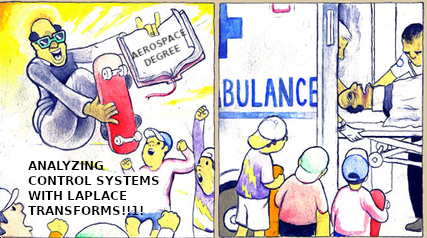
So when he happened to be milling around my office one afternoon and saw my BSE in Aerospace Engineering, he did a double-take and said: "Wait... you have the same degree as Mark Rober??"
I suspect the feeling I had in that moment is the closest I'll ever get to how Tony Hawk feels all the time.
The Catstronaut🔗
He wanted to build some model rockets, so I obliged. His first rocket, the Cosmic Cargo, we assembled at the kitchen table in about 15 minutes. This kid-friendly model has a payload section in it. We stowed a small rubber cat, dubbed the "Catstronaut".
I built one of my own, a classic Alpha model, while he mostly observed. I explained that the performance you get out of the rocket depends on how much time and attention you put in to making it. That if you take pride in your work, it will pay off.
On launch day, we launched both rockets using the same motors. He was annoyed when mine appeared to move nearly twice as fast and fly twice as high as his, and he kept wanting to use larger and larger motors to see if he'd "beat" me (I tried explaining he had a heavier rocket, but it didn't seem to click).
Cat-astrophe🔗
For the final launch, he insisted on using a C6 motor, but I was iffy. These motors deliver a little less average force, but they burn around 2x longer than the A-class motors we'd started with, and the fins are plastic and held in place with some little tabs.
Now, Estes does technically suggest that the Cosmic Cargo will run C-class motors, which unfortunately gave the eight year old documentary evidence supporting his position. He demanded we go for it.
So we did. My rocket was fine, but his fell apart about 1000ft in the air.
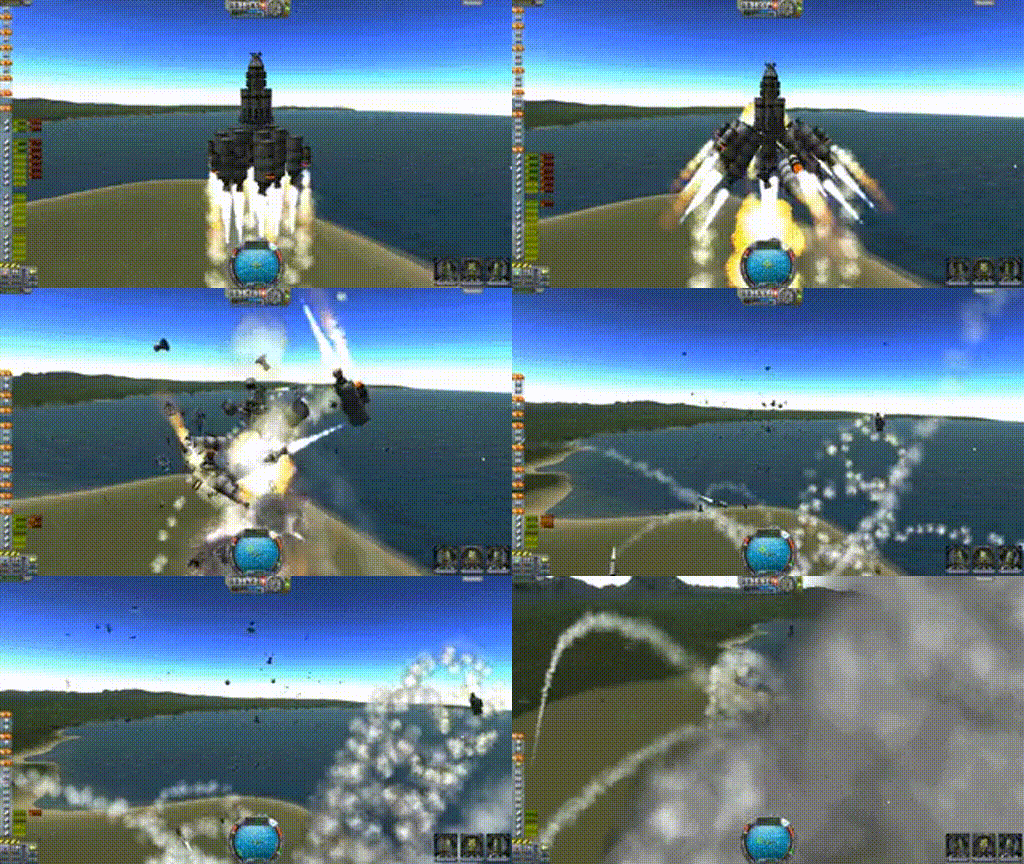
We recovered the rocket body, and safely recovered our feline passenger. A brief post-mortem was conducted and our best guess was the longer-burning engine had softened and warped the plastic fin assembly, and the parachute deployment charge had, instead, blasted the fins off into the stratosphere, never to be found.
He was deeply distressed that his rocket had failed, and we talked about how his priority as the overseer of the project was to ensure the safe recovery of his crew. In that way, he'd been 100% successful across several launches.
When that didn't help, I pointed out that it just means he learned something so his next rocket will be even better! That actually worked, but then all he wanted to do was make plans for a newer, better rocket. The kind of thing Mark Rober would make. Some highlights:
- "It should be radio controlled!"
- "It would be so cool if we could automatically track how high it went!"
- "What if we could track it if it got lost?"
- "What if we could press a button, and have it beep at us when we're trying to find it, in case it lands in some trees?"
- ... and a bunch more that I honestly don't remember. I think "deploy a drone" was in there somewhere, but I'm unclear what the drone would do.
The funny thing is I had all these same ideas when I was his age. I guess time really is a closed loop. The biggest difference between now and then is that now I'm an adult with disposable income, a (shitty) 3D printer, access to cheap microcontrollers and absurdly good sensors, and twenty years of accumulated education and experience. A bunch of the stuff he's imagining is actually doable today.
But this is also where I made my first mistake: where I thought we were brainstorming, he thought we were gathering requirements.
Green Eggs and a HAM🔗
Flash forward a couple weeks, and I'm sitting in my office staring at an Estes Green Eggs rocket kit. This is one of those classic kits, where you have a fat payload section that can store an egg.
I'm honestly surprised they still make these. Back in the 90's, my folks wouldn't just let us run out of the house with a half-dozen eggs. So the one or two times anyone had something like this, it got filled with plastic army men or dog poop and sent on its way.
Anyway, where the Estes designers imagined an egg, I was imagining a telemetry payload. One that could do all the magic things the kid wanted to see. This put some constraints on the project:
- The entire payload could not weigh more than an egg (~57g)
- Everything needed to be mounted to some kind of sled that could be easily inserted or removed
- The sled needed to be light enough to not take up too much of the weight budget, but strong enough to withstand impacts.
- Fully-assembled, the payload needs to remain fixed, and can not shift the rocket's center of gravity outside the line of thrust.
That last bit may not be obvious, but if the rocket's motor isn't pushing on the rocket's center of mass, it's imparting a moment that a rocket with static fins can't counteract. It will cause the rocket to veer off and possibly crash.
Oh, and it all needs to fit in this ~42mm tube:
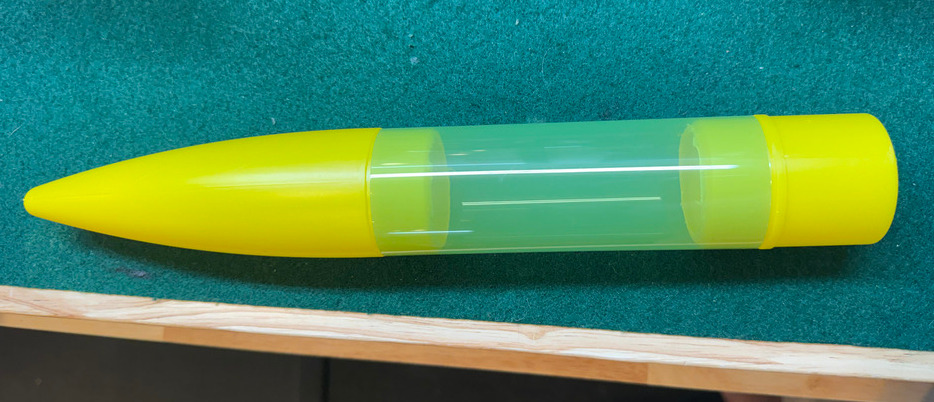
I ended up going with a LoRa-enabled RP 2040 from Adafruit for the primary microcontroller. It's basically a thin microcontroller board built around 32-bit dual-core ARM Cortex-M0+, augmented with a built-in RFM95 radio transmitter/receiver. It operates on the unlicensed ISM spectrum, so you don't need a special FCC license for it (even though I do hold a technician license).
Basically the payload is a RP2040 + LoRa, GPS, pressure altimeter, IMU, buzzer, battery (see the appendix at the end for a specific parts list).
The tricky part was working out exactly how much space I had to work with, and how to organize and fit all these parts. Every gram of PETG was a gram I couldn't spend on battery or sensors. Making the sled thinner saved weight but made it fragile; moving components made wiring easier but changed the balance; adding supports solved one problem and created another.
After many long nights tinkering with OpenSCAD and my 3D printer, I finally had something that could meet the criteria:
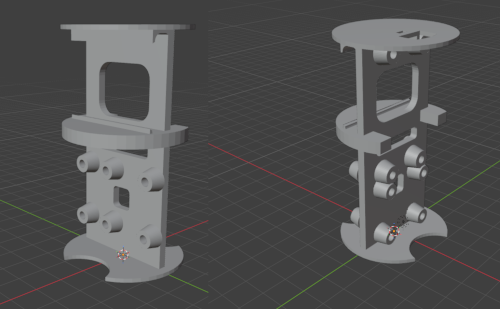
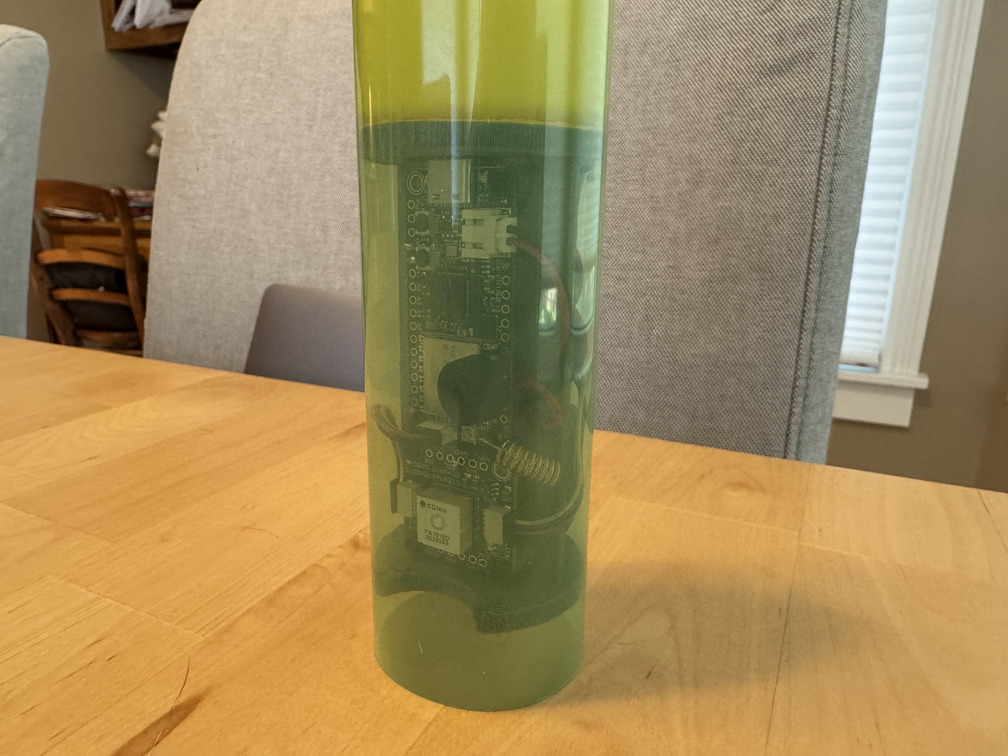
This sled, with all the components mounted, came out to 54.7g against a 57g ceiling.
The Code🔗
I programmed the payload Feather to broadcast its telemetry every second, and I hooked a companion Feather up to my laptop and had it listen for those broadcasts. Whenever it got one, it dumped the telemetry out to the console.
I proudly showed it off to my son, hoping for another hit of that "wow, my dad's awesome" energy. But what I got was:

Oh... So we have take your computer out with us next time? It would be cool if you could put that (pointing at the Feather) in a controller with a screen so I don't have to walk around with your laptop.
Uh, yeah, okay kid. Fair enough. This is a little on the janky side. Let's see what dad can come up with.
Mission Control🔗
Back to CAD. I ended up adding some more things to the second Feather, the one I dubbed "Mission Control." This one consists of the companion RP2040 + LoRa, with GPS and a Sharp display (basically a cross between eInk and LCD that is low power and easy to read in the daylight). After more evenings and weekends tinkering, I finally ended up with an assembled housing, and a working prototype:
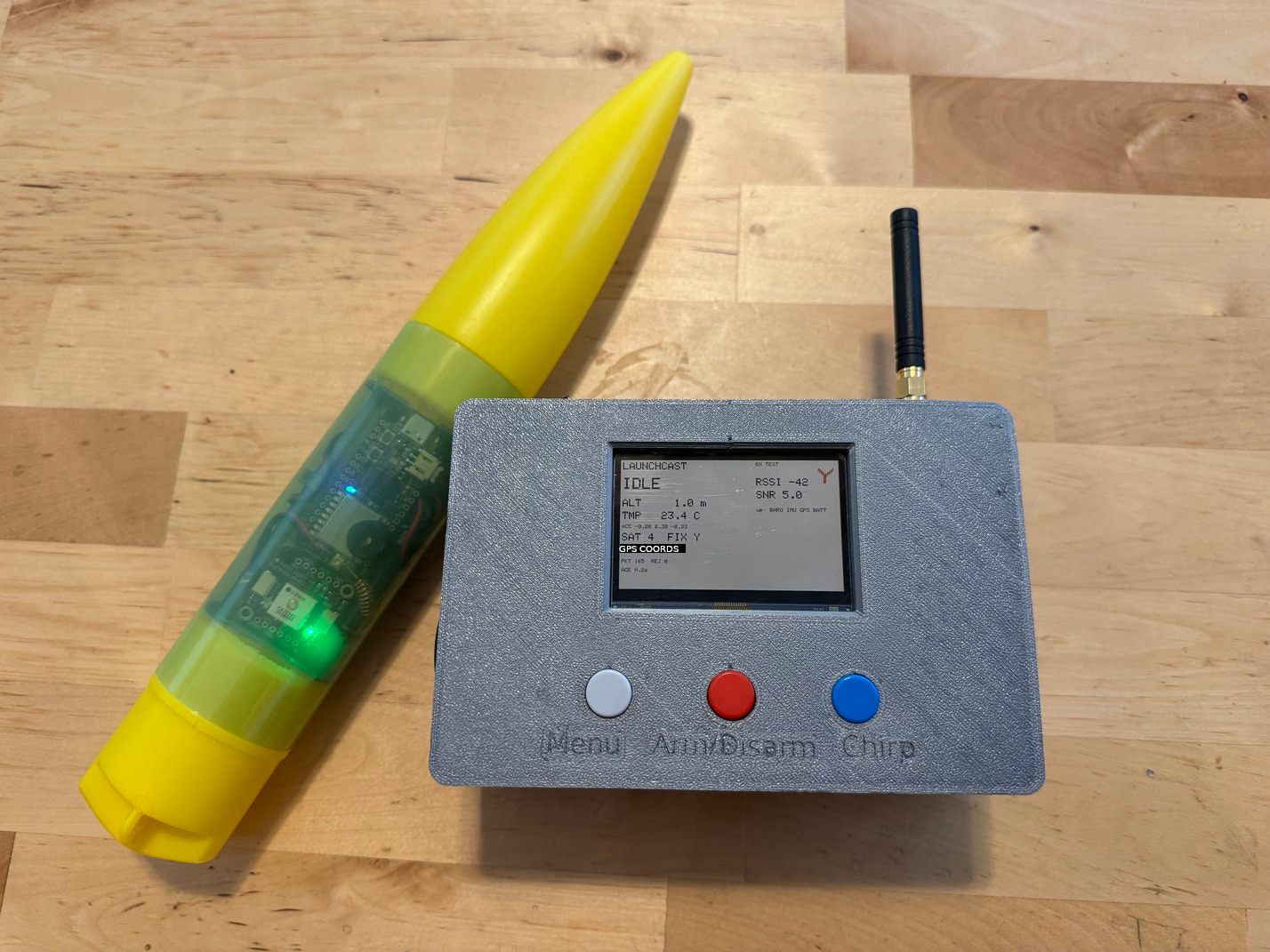
When I powered up both units, the payload began transmitting and mission control picked up and decoded the transmissions and wrote them out to the screen. Now we're mobile!
Enter the kid:
What do those numbers mean? (gets explanations) Oh. You should make them better, so I know what I'm looking at.
If I had a dollar for every time a reviewer gave me a comment like "yeah it's good but make it more better..." well, I wouldn't be rich, but I'd have enough for a nice bottle of bourbon to drink while trying to work out what "make it more better" even means.
For context, this is what he was looking at:
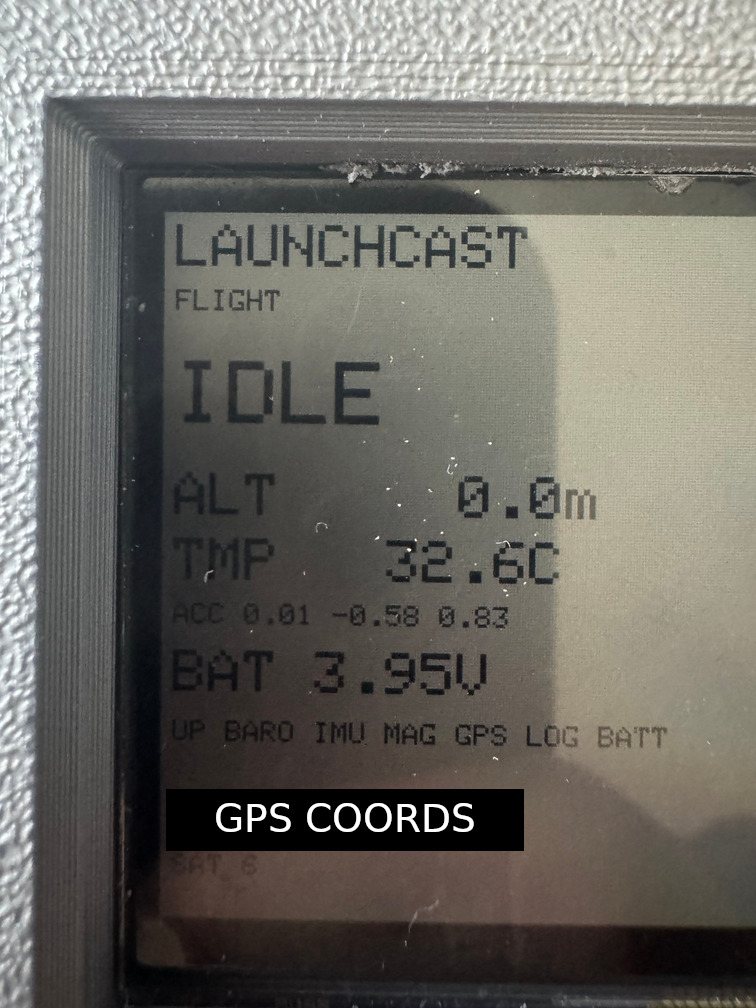
So I guess the feedback is fair, from the perspective of a kid.
Improving the UI became the next sprint. I reorganized the main screen and brought in some glyphs to add a bit of kid-friendliness. Overall it turned out pretty nice:
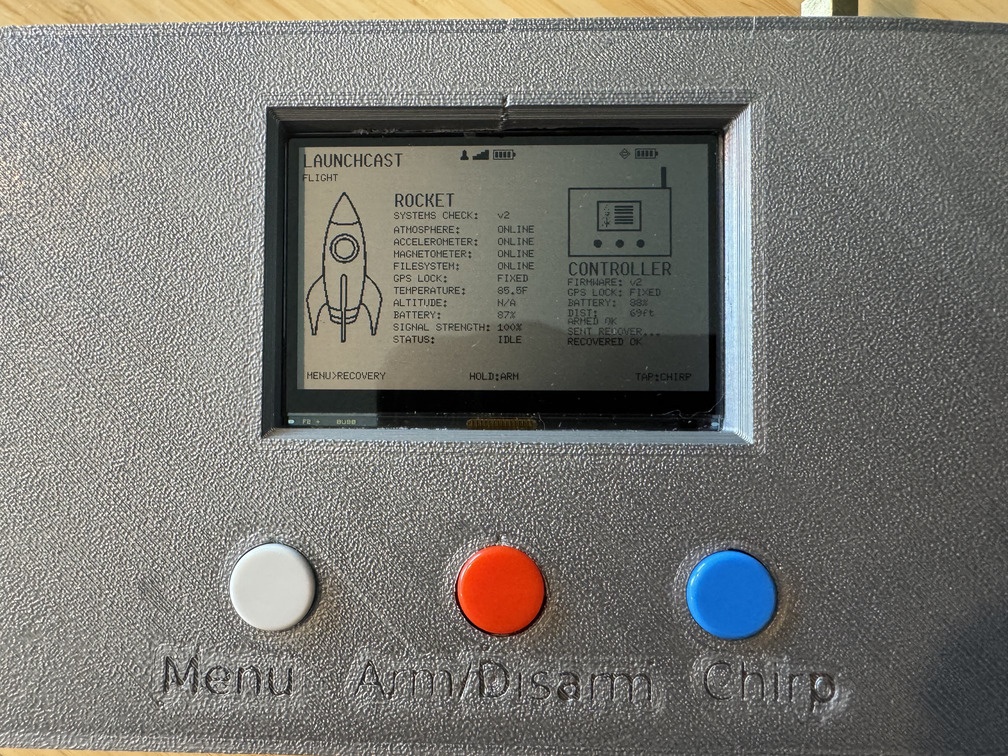
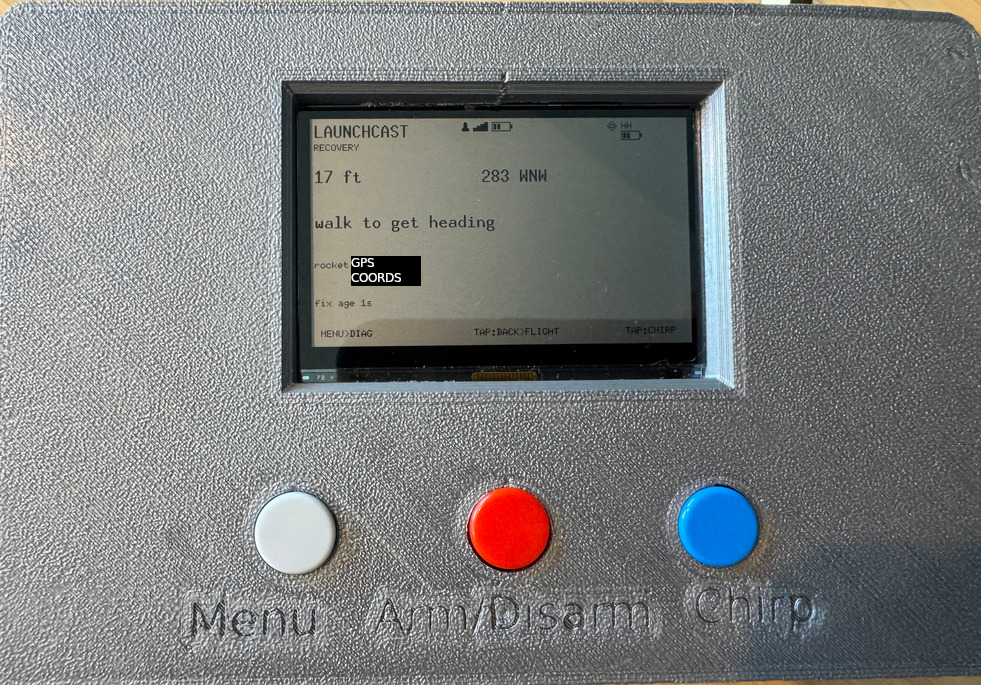
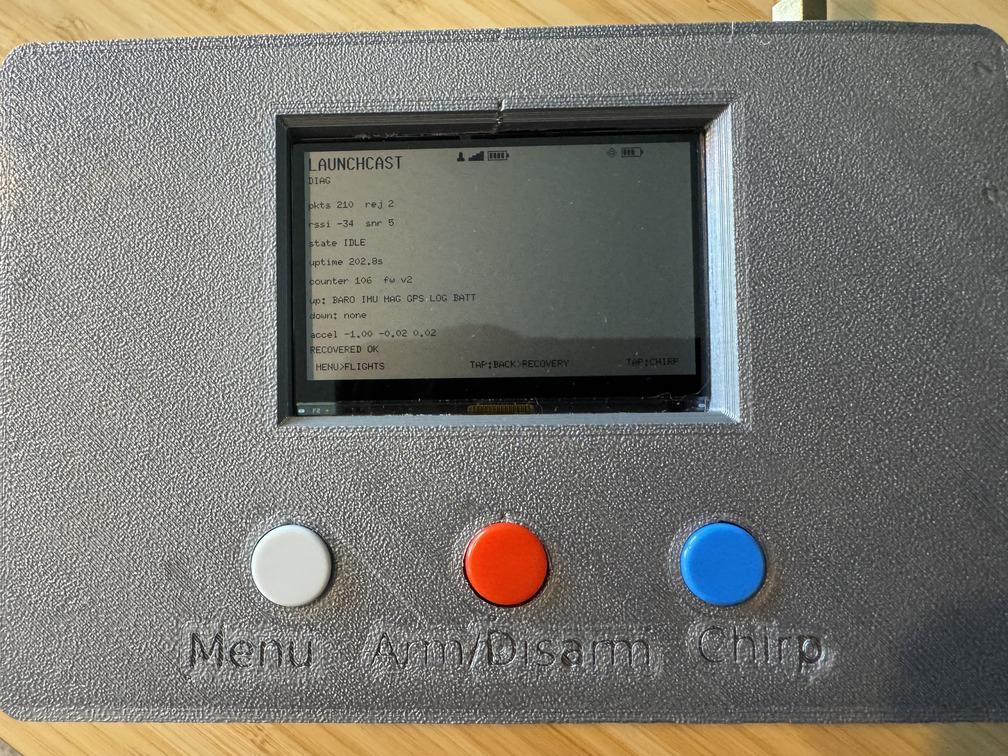
Pressing the MENU button cycles through the different screens, holding the ARM/DISARM button tells the rocket to toggle its flight readiness, and the CHIRP button tells the payload to beep the piezo buzzer a few times.
Design Review #1🔗
I was all hyped up to demo it to the kiddo and get more of that "whooaa dad this is amazing!" energy. I proudly handed over the powered up units and listed off all the cool things we could do with the radio controls. How we could get the rocket's exact GPS position, calculate distances, see power levels and status checks on all the sensors. The whole thing.
After a few minutes of interacting with the controller, my mini QA department offered some feedback:
This looks cool, but the buttons are really laggy. When I press the CHIRP button, sometimes it takes a few seconds to make a noise. And the noise is really quiet. If I were you, I would make it not do that. You should make it not be like it is.
Sigh.
The thing is, he was right though. The buzzer was somewhat muffled, being inside the tube. And sometimes the buttons did lag. So I did some more work.
For the piezo, I did some fun tricks. Instead of running it from a GPIO to GND, I ran it between two GPIOs so that I could essentially double the voltage applied. I also did a bench sweep, where I had the Feather apply increasing frequencies on the buzzer and used a decibel reader app on my phone to measure how loud it was. I used this to find the sweet spot where the piezo would make the loudest sound it could. Now it was so loud, it can be plainly heard, from within the tube, at least 100 yards away.
For the lagginess, my intuition was that the GPS polling code was the culprit. CircuitPython technically supports async/await, but its concurrency is cooperative, meaning blocking operations can still stall the Python execution path.
But when I measured it directly, it was 52-54ms per update, too fast to be the cause. So I instrumented.
That's how I found an actual bug, where the button-hold state machine reset its countdown on every press edge, including a bounce mid-hold. A noisy contact could silently restart the timer, which was why this seemed so transient. But even after fixing that, there was still a ton of delay.
The same instrumentation also showed a real out-of-memory crash, sporadic memory allocation failed, allocating 9516 bytes on a board with plenty of memory in aggregate. It turns out CircuitPython's GC doesn't compact the heap.
Researching CircuitPython's limitations more at that point, I found out that it doesn't even expose the RP2040's second core to general user Python execution. I could cooperatively schedule tasks, but I couldn't isolate sensor/radio work on one core and keep the UI running independently on the other.
So I turned to Rust.
Rust To The Rescue!🔗
Rust is actually better suited to an embedded device like the RP2040 anyway, due to its limited resources. The execution overhead is much lower: it doesn't require a VM to run bytecode, doesn't need a garbage collector, and async is a first-class citizen in the language. There's more work involved up front, but it pays off in production.
A Rust rewrite would also allow me to delegate the UI/UX work to one core and the radio & sensor interactions to the other. So the system wouldn't be laggy, and would actually be a lot more reliable in practice.
The tradeoff is that documentation on all of this is a lot more sparse, and you have to hand-roll a lot of your own libraries. Python really does abstract away a lot of work that you have to implement yourself in Rust.
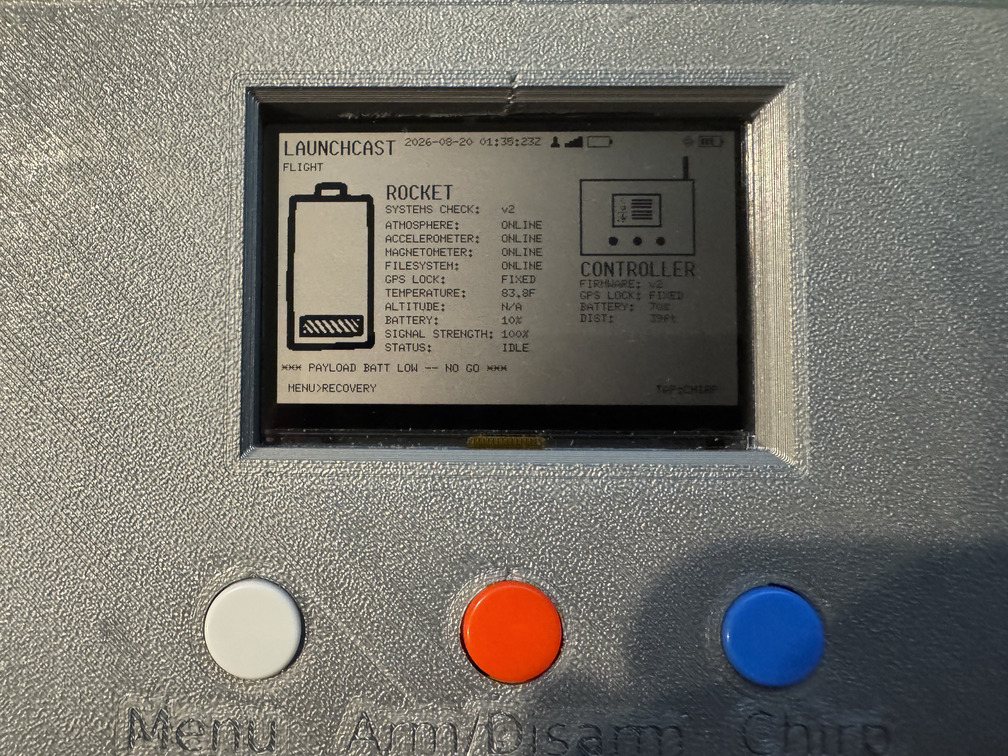
So, after many evenings of work (and a lot of assistance with the LLMs), I had a complete port of the Python codebase into Rust. I even made some improvements, like adding a "low battery" glyph:
To say the hardest part turned out to be the logging portion would be underselling things a bit. True, Python made the Feather a plug-n-play system; you could just connect the Feather to your computer via USB and pull log files off. But more to the point, the FAT filesystem itself turned out to be a liability.
With CircuitPython, repeated hard resets while iterating on boot.py actually corrupted the board's internal filesystem. Even re-flashing CircuitPython did fuck-all; recovery required a manual storage.erase_filesystem() from the REPL. This happened multiple times while testing new code, and I started to think that if it happened in the field, or there was an unexpected loss of power, I'd lose the entire flight.
Once I was in Rust anyway, I stopped pretending the rocket needed a user-mountable filesystem. I gave the telemetry logger a raw flash partition instead. Now I write the telemetry to a buffer that's flushed to disk every 500 lines or 5s, whichever comes first, and it's insanely fast and reliable.
The tradeoff was I couldn't just connect the Feather up to my laptop and pull down log files anymore.
Design Review #2🔗
When everything was working, I called the kiddo in to check it out. I proudly showed off the new, snappier system. He took it, and started mashing buttons and watching menus change and hearing the payload system chirping on command. Arming and disarming the telemetry system happened flawlessly.
I expected him to beam and admire the system I'd worked so hard on. Instead, he cocked his head and asked:
So after the rocket comes down, how do we know how high it went?
I explained how the telemetry system starts recording when it detects sudden acceleration, and that when it's been recovered, we just plug in the USB line and use a special program to pull down and deserialize the data into a CSV that we can pull into Excel and analyze.
His eyes had glazed over, and he followed up with:

That sounds like a lot of work, you should do it so that we can just see it right away without doing any work.
This fuckin' guy.

Wireless Telemetry Retrieval🔗
So it was back to the drawing board. The first thing I looked at was how much data was used per entry, and estimating how much data I expected to collect for a typical flight. It turned out to be a few MB.
That doesn't sound like a lot in 2026, but the thing is, LoRa isn't really designed for high-bandwidth use cases. To download a few MB of content, you'd need many packets, and you'd essentially be need to reinvent chunking, sequencing, checksums... the whole 9 yards. It's a tall order with virtually no benefit.
But then I realized that, in the field, we don't care about every line of telemetry collected, we only care about what headlines the telemetry could give us: max speed & max altitude.
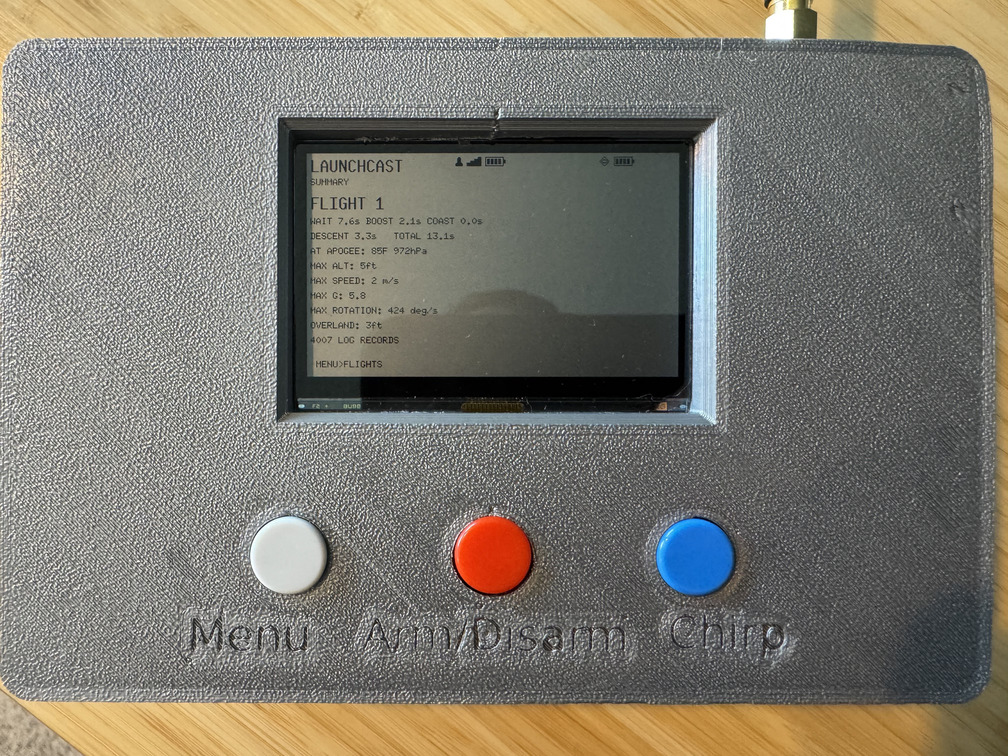
Those two data points would fit comfortably in a single packet, with room to spare. We could add more, like how long each phase of the flight lasted, how many g's the rocket experienced, how far overland it traveled, and so on. Just the cool stuff.
My first pass just kept a local list of flights on the controller and trusted it. Then I remembered the hardest problem in computer science and realized I didn't have a cache invalidation story. If I purged the data from the rocket, the controller would still think the data is available and could try to request it.
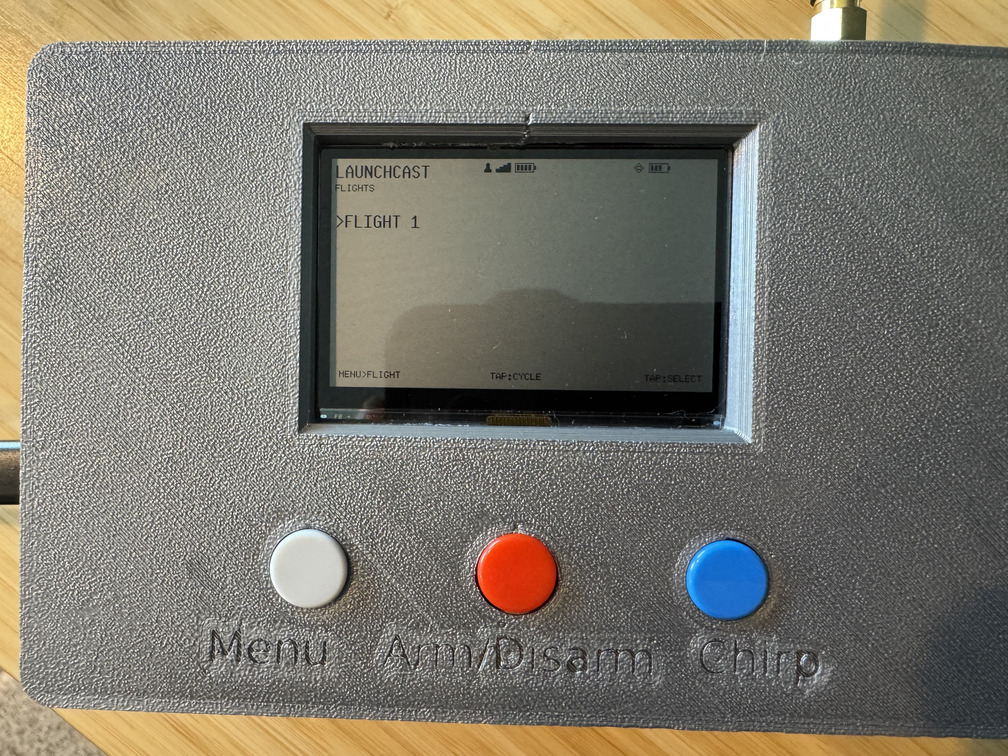
I ended up implementing a system where the controller maintains a local data cache. Whenever it opens up the FLIGHT LOGS screen, it pings the rocket for a list of flights. If it gets a response, it iterates over each flight not already cached and requests the flight profile metrics from the payload, and receives the important numbers ("just the cool stuff"). Those also get cached locally on the controller.
This allows us to pull down and "save" the major details of a flight in the field, and cache them for review. We can review them in any order at any time without needing to pull them down each time, which also means we can turn the telemetry system off to save power. There's even a "clear local cache" option on the controller, if I want to force a rebuild for some reason.
Honestly, this ended up being one of my favorite features:
Somewhere in here, I also realized that the GPS telemetry I was getting includes a timestamp, which lets me also display the local time on the controller screen, and include the UTC in the telemetry logs.
To Infinity, And Beyond!🔗
I informed the kid that we were now considering the project feature-frozen until we could test it in the field. Here it is, painted and ready to fly:
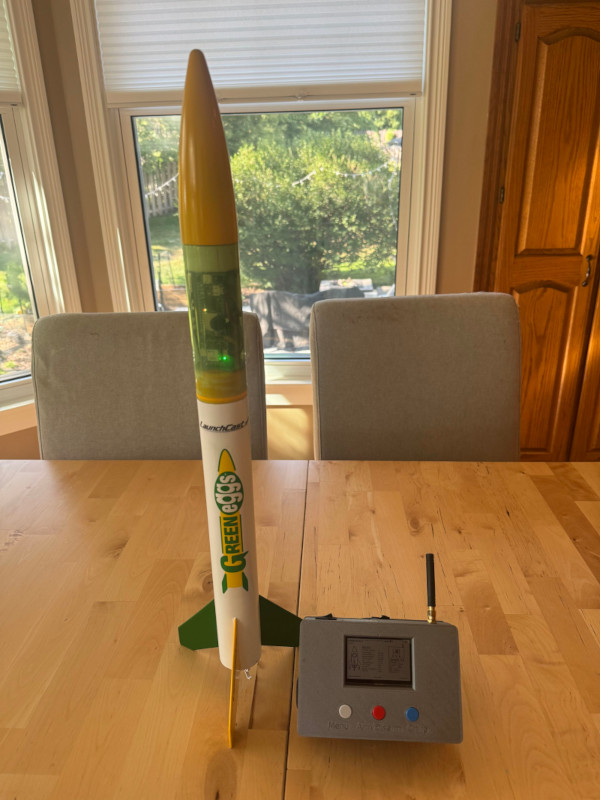
The Green Eggs rocket is designed to host D and E sized engines, which are larger in diameter than A, B, or C. But I happened to have an adapter kit, so on launch day, I decided to do a low-power soft launch with an A8.
We armed the rocket and launched; it flew fine, popped the parachute and came down gently. Sadly, when we went to check on it, the telemetry system hadn't triggered the state machine. I guess it didn't register enough sustained thrust from the undersized engine.
Undeterred, we loaded up a D12 motor. Armed the rocket, did a countdown, and launched... only to experience a catastrophic takeoff (CATO). Basically, instead of controlled thrust, the motor dumped all of its powder at once; the rocket body made it about 30 ft into the air before the payload blew out and drifted down.
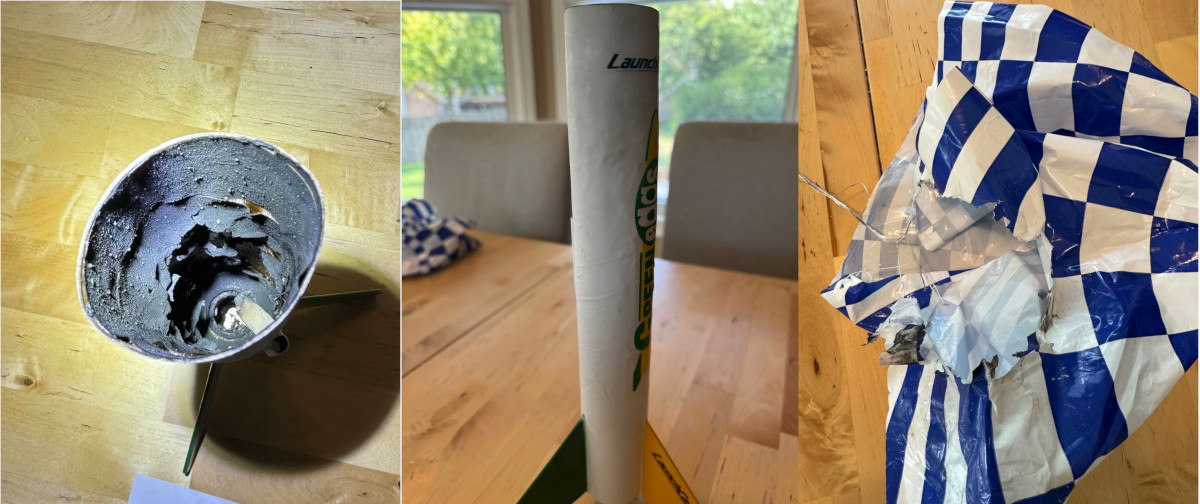
Fortunately, the electronics survived unscathed. I was able to pull data off and generate a chart of the telemetry collected from the failed takeoff:
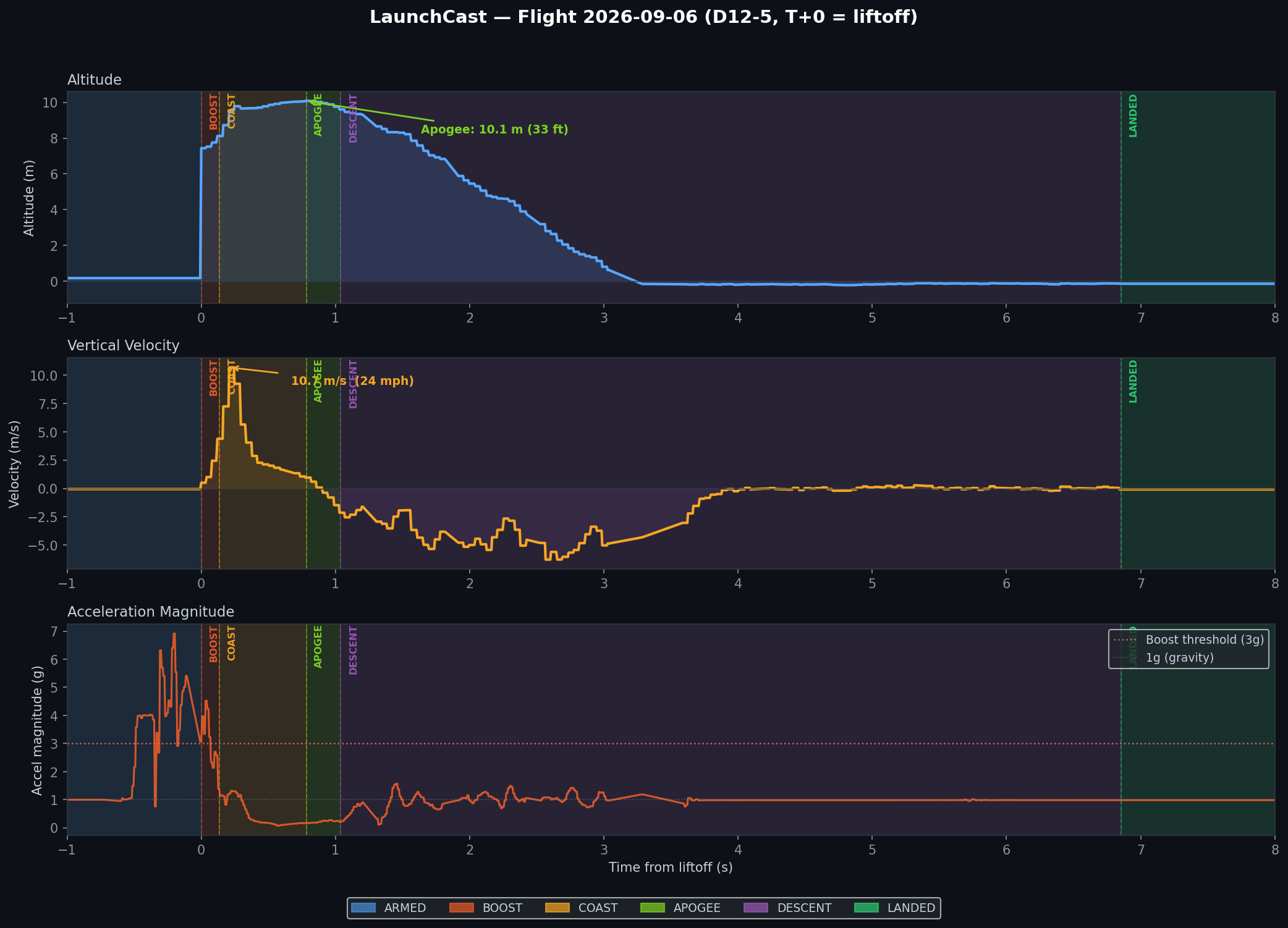
I filed a CATO report with Estes, and they agreed to issue a store credit for the Green Eggs kit and failed motors once I send the damaged hardware back. So for now, the project is grounded.
And this was the feedback I got from my fearless leader:
That was so cool until you accidentally blew it up. You should build it so that doesn't happen. Whatever you did to make it explode, try to not do that next time and it'll be a better flight.
Mmm hmm.
Appendix: Parts Lists🔗
The payload build:
- PA1010D Mini GPS. Lets the payload find its own location.
- BMP580 Temp/Pressure. Measure temperature+pressure, but also accurate enough to work out altitude.
- LSM6DSOX + LIS3MDL. Accelerometer and magnetometer for measuring motion.
- A little piezo buzzer for fun. Goes "beep".
- 3.7v 500mAh LiPo battery. Powers everything.
The controller build
- A bay of cool buttons. 3 buttons to rule them all (because that was about all I could fit)
- PA1010D Mini GPS. Lets the mission control find its own location so it knows how far away and in what direction is the payload.
- 400x240 SHARP Memory Display. A cross between eInk and LCD, basically a low-power, high-contrast screen that can be easily read in daylight.
- Mini GSM/Cellular Antenna. Lets mission control pick up fainter signals from the payload.
- SMA to uFL RF Adapter Cable. Connects the Feather to the antenna
- 3.7v 2500mAh LiPo battery. Powers everything.