About 10 years ago, I was working on a project that involved some very long-running computations on my desktop that needed to be closely monitored. While this was running, I needed to travel, urgently and unexpectedly, and only had a couple hours to get ready and get to the airport.
At the time, I was also dealing with an ongoing issue with my ISP. We'd get these random 15-30 minute outages, and then be back online with a new public IP address. It was happening enough that at one point Netflix briefly decided I was apparently operating an underground account-sharing syndicate and threatened to suspend my account.
I knew I'd need to be able to check on the status of the analysis regularly, but I also knew that my desktop would probably get at least 1-2 new public IPs while I was away. I needed a way to be able to SSH in reliably, without knowing my home IP address.
I had maybe an hour to get something working, and my solution was a cronjob on the desktop that periodically checked its public IPv4 and wrote it out to a file tracked by Dropbox. Then on my laptop, I set up an entry in ~/.ssh/config that used ProxyCommand and a custom script that essentially read the tracked file and used it to construct an SSH command to the desktop:
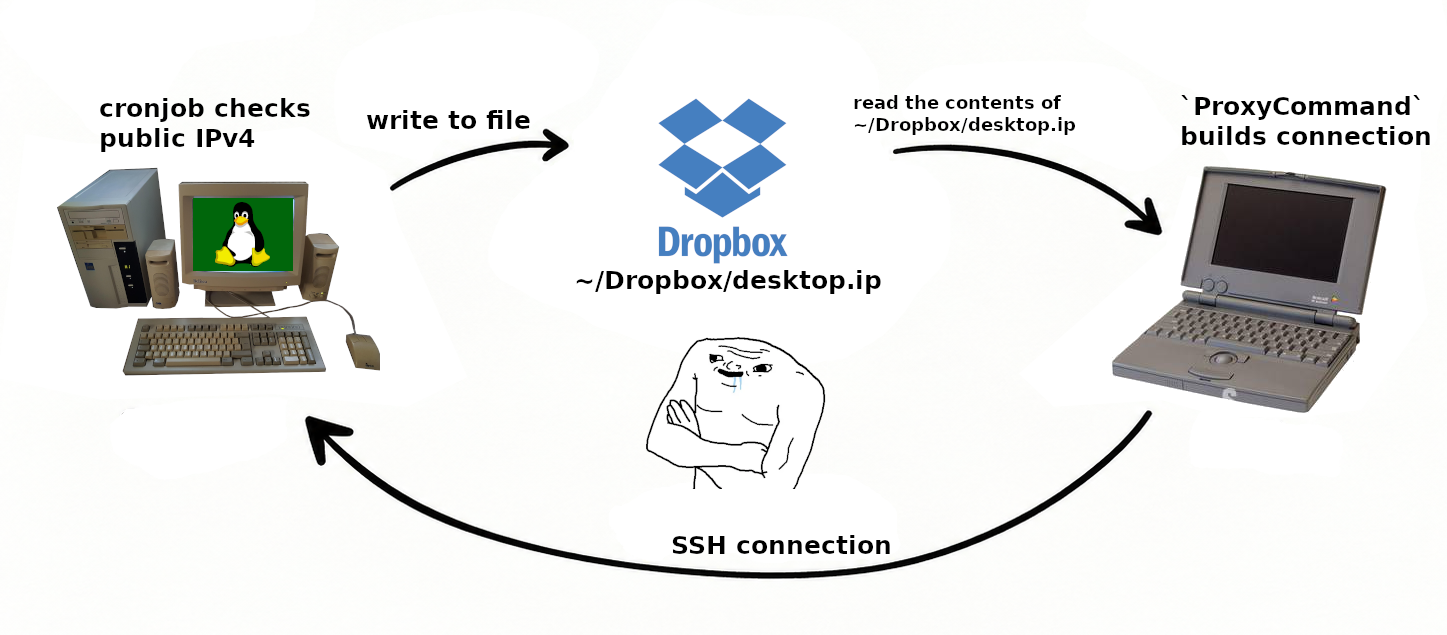
It wasn't pretty, but it worked. No matter where I was or how often my ISP changed the public IPv4, I would only ever have to wait for the desktop's cronjob to run before I could access the system. And somehow it was ridiculously reliable.
In fact, it worked so well, I actually forgot it was even there. For like 10 years, it just dutifully did its thing. Even as I got new laptops and ported over the scripts and configs, it all just worked.
It Wasn't The Sync That Made The Script Sink, It Was The Auth That Finished It Off🔗
Everything was fine until Dropbox's Linux daemon went to a short-lived token approach. Now, periodic re-authentication from the machine was needed to keep files synced. At first, I didn't really care because I'd forgotten about this little hack I'd been using. I just re-authed whenever my desktop's token expired.
Then one day I was at a coffee shop and tried to SSH in to my desktop, only to find it unreachable. ssh -v desktop just showed the connection stalling to reach the IP. At first, I thought maybe there was an ISP outage, so I pulled out my phone and opened up the Nest app, which was phoning home just fine. That ruled out outages at the ISP and power company. Did the desktop itself crash? A circuit breaker trip?
I traced the path I was using for SSH: ~/.ssh/config led me to ~/bin/ssh-proxy-desktop, which led me to ~/Dropbox/desktop.ip. Everything looked fine until I noticed desktop.ip was last updated 2 days ago. Well... fuck. I thought.
Turns out two things had happened: (1) my ISP had assigned me a new public IP address, and (2) the Dropbox daemon on the desktop had an expired token and wouldn't update the IP file until I re-authed... which I couldn't do remotely because the IP was now stale.
Fortunately, I wasn't quite dead in the water... thanks to my HVAC system. I was able to pull the current public IPv4 from the Nest app, which I saved to ~/Dropbox/desktop.ip, and boom: ssh desktop was operational. But if the IP changed again, I'd have to redo this dance.
There's a very petty part of me that briefly considered replacing Dropbox with Nest for this purpose. The title of this post would have ended up like "Replacing Dropbox with Nest As A DNS Resolver" or something equally absurd.
Fortunately for all our sanity, I didn't really want to deal with that new layer of complexity. I figured it was long past time to come up with something more robust.
Peak Dunning-Router🔗
DNS, in very simple terms, is kind of like the Internet's phone book, where human-readable names like google.com are translated into IP addresses. We do this because: (1) IP addresses aren't really units of information intended for humans, that's how machines reach machines. And (2) those addresses are often ephemeral. We use DNS as an abstraction layer so that we don't have to deal with memorizing constantly-changing IP addresses.
My Cron+Dropbox solution produced this same effect via a very different process, while also avoiding DNS caching entirely and offering an out-of-band file that could be inspected for freshness.
I figured a viable workaround would be to get some stupid domain name, and then, instead of my script writing an IP address to a file in Dropbox, I'd have awscli update a record in Route53 or something. This would make my ~/.ssh/config even simpler, because I wouldn't even need ProxyCommand.
I was feeling pretty good about this, and wondered why no one else had ever thought of it. At the same time, I had some unknown unknowns -- like, what are the tradeoffs in TTL for DNS? Is there some cache invalidation gotcha I need to plan for? So, I began reading documentation.
That's how I discovered I was standing at the peak of Mount Stupid:
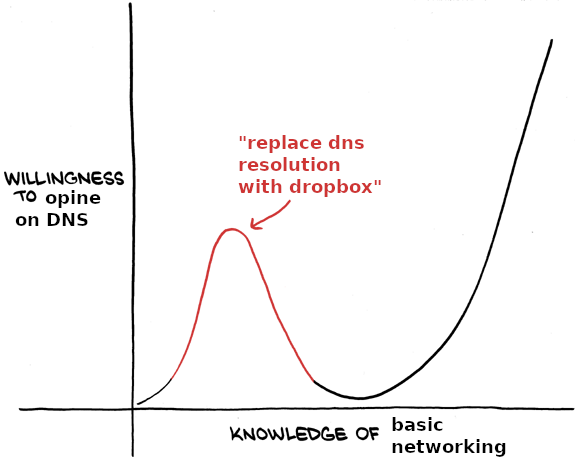
It turns out quite a few people had thought of it. Enough people, in fact, that consumer routers had a dropdown menu for my breakthrough. While reading around, I ended up in the CloudFlare docs, where I learned that not only is my brilliant hack already a solved problem with multiple implementations, but it already has a name: Dynamic DNS (DDNS).
Dynamic DNS is simply a process for automatically updating the IP address associated to a domain, if that IP address changes. Broadly, it does exactly what I'd imagined: some system on the network regularly polls its public IP address, and updates a public DNS record if the public IP changes. You connect to the network through a DNS address and not an IP address.
I also learned that this is enough of a thing that a few home routers support DDNS out of the box, others can support it with flashed firmware, like OpenWrt. PFSense supports it too. You can also use a service like DuckDNS, where you get a subdomain like myhomerouter.duckdns.org and an API key for updating the IP address. This is nice because it's free and you don't need to register a domain name. If you want a domain name, you can register something like "myhomeserver.com", and configure a service like CloudFlare to manage the nameservers for the domain name. You'd get an API key from CloudFlare that allows you to make DNS changes as needed.
And, of course, Linux/Mac devices can utilize cron to run such a script on a schedule, essentially what I was already doing.
Regardless, it all works the same: check every X minutes to see if the public IP address has changed, and update DNS records if it has. But with DNS instead of Dropbox.
The BMW And The Beer Can🔗
There's a famous passage in Zen and the Art of Motorcycle Maintenance where the narrator's friend John has loose handlebars on his expensive BMW motorcycle. The factory collar assembly isn't gripping tightly enough, so the narrator proposes cutting a shim from an old beer can. Aluminum is soft, won't rust, and would solve the problem cleanly.
John refuses. The idea of repairing his meticulously engineered German motorcycle with a piece of garbage offends him, and he just lives with the loose handlebars.
Pirsig goes on to elaborate that a guy who understands his bike well enough to solve mechanical problems on the side of the road, using only his wits and what's immediately available to him, is experiencing a sort of Zen. The point is that the quality of a fix doesn't reside in whether it looks like the solution BMW intended; it resides in whether it solves the problem well.
Using Dropbox for DNS was my beer can shim: a solution that worked reliably for more than a decade. Far longer than the short trip I'd originally built it for.
If It Looks Stupid, But Works For 10+ Years...🔗
You'd think there'd be an inclination to be embarrassed or self-conscious for learning about DDNS so late in my career. I don't really see it that way. The way I see it, good engineering is not the same thing as knowing the approved solution. It's understanding the system well enough to produce a solution appropriate to the constraints you actually have.
Sure, knowing the canonical answer is "Dynamic DNS" would have saved me from reinventing it, but even so I probably wouldn't have had enough time to get it running and catch the flight. The problem existed in a context where time pressure had eliminated DDNS as an option. The option was to either live with the issue, or MacGyver a fix with whatever was immediately available.
That's the distinction Pirsig was getting at: the quality of a solution isn't determined by how closely it resembles the approved one. It can be ugly, non-standard, temporary, even completely unhinged in conception... and still be high quality if it solves the actual problem reliably.
The right tool is great when you have it. Understanding is what gets you home when you don't.
Appendix: Roughly How It Worked🔗
I don't have the actual scripts anymore. This is a decade-old hack and the exact wiring is long gone, but it looked something like this:
On the desktop, a cronjob wrote the public IP to a file Dropbox kept in sync. I did this every 15 minutes or something to keep from spamming a free service:
*/15 * * * * curl -s https://ipv4.icanhazip.com/ > ~/Dropbox/desktop.ipOn the laptop, ~/.ssh/config pointed at a script instead of a host:
Host desktop
    ProxyCommand ~/bin/ssh-proxy-desktop
And the script just read the Dropbox file and handed the connection off:
#!/usr/bin/env bash
# ~/bin/ssh-proxy-desktop

# ProxyCommand doesn't want an SSH client, it wants something that opens a raw
# byte stream to `host:port` and shoves it to stdin/stdout. Thus, `nc`
# `ssh` runs its own protocol (key exchange, auth, encryption, etc) on top of
# that stream.
#
# ssh uses port 22 by default, but since this is open to the Internet, I use
# a non-standard port. I don't actually use `1234`, but if I did, this is what
# the command would look like:
exec nc "$(cat ~/Dropbox/desktop.ip)" 1234
ssh desktop would always connect to wherever the desktop actually was, usually within a few minutes of it changing.